MINI course Plug and Get Paid
iDEAL payments in Squarespace with Plug&Pay
Please note: Starting in February 2026, iDEAL payments will be available directly through Squarespace. You can read more about this here.
5 Modules
All actions in Plug&Pay, Mollie, and Squarespace are explained here.
3 Bonus modules
Do you work with Moneybird, Mailblue, and/or Courses? Then you can also link these to Plug&Pay.
1 year access
Because then you really need to have everything ready and be selling :-)

without iDeal, it's not so ideal
Plug&Pay to the rescue
Squarespace only accepts payments via credit card and PayPal. However, if most of your customers are in the Netherlands (and Belgium), iDEAL (and Bancontact) are essential payment methods.
By using Plug&Pay, you can easily sell your service or product on your Squarespace website using iDEAL (and Bancontact). Invoices are also sent automatically after payment. This reduces your workload and saves you time. This approach not only makes things easier and more convenient for your customers, but also for yourself.
What will you learn in this mini-course?
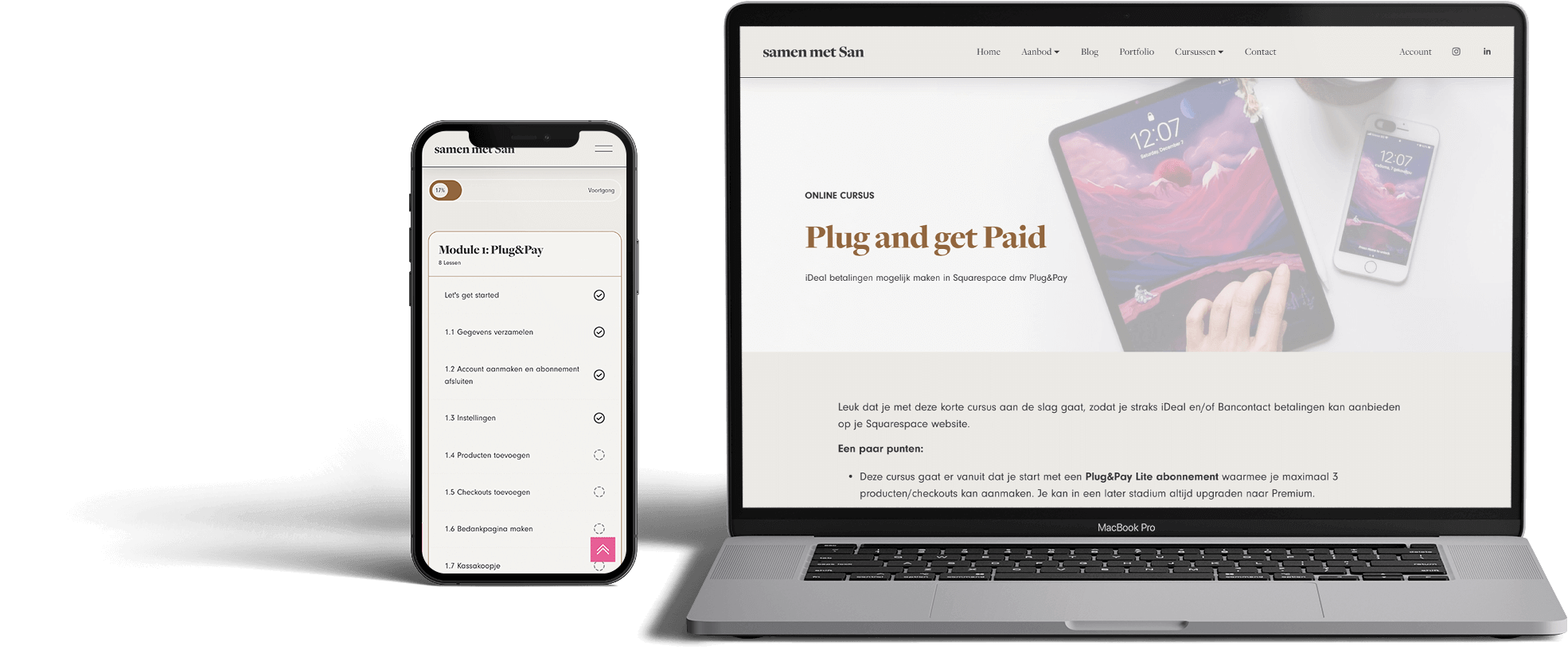
This short online course takes you step by step through the process of setting up Plug&Pay (Lite version) and payment provider Mollie, and how to link this to your Squarespace website.
This training consists of 5 modules (and 3 bonus modules) in which the entire process is explained step by step in text, supported by images where necessary.
With this training, you can be sure that you won't overlook any important issues and that everything is set up correctly.
At the end of this mini-course...
Can your customers pay on your website using iDEAL and/or Bancontact?
Do you have a payment page that looks professional?
Are invoices sent automatically?
Are people automatically added to your email list (if you use Mailblue)?
Do you have a streamlined payment process for your online courses?
Overview of modules
Module 01 Setting Up Plug&Pay
Module 02 Setting Up Mollie
Module 03 Integrating Plug&Pay and Mollie
Module 04 Action Items for the Sales Page
Module 05 Activation and Test Payment
Bonuses
Module 06 Moneybird Integration
Module 07 Mailblue Integration
Module 08 iDEAL in combination with Squarespace Courses

Hi, I'm Sandra, a Squarespace web designer
I have been working with Squarespace since 2016 and have helped more than 100 entrepreneurs with their websites.
One of the biggest frustrations for Dutch Squarespace users is the lack of iDEAL and Bancontact payment options. Since I often get questions about this, I’ve developed this mini-course.
This mini-course is for you if…
You want to sell a service or course on your Squarespace website using iDEAL and/or Bancontact.
You want to automate the sending of invoices for online payments.
You want to be sure that everything is set up properly and that you haven't forgotten anything.
❌ You want to set up a web store and allow your customers to purchase multiple products at once on your website.
“Forsomeone like me who is not at all technical, this course was invaluable. In no time at all, I had made all the connections myself and integrated them into my website. Mollie, Plug & Pay, it's all up and running now. Sandra provides a clear, concise overview and a step-by-step plan with screenshots. Highly recommended!”
Thetraining covers all the steps needed to connect Plug&Pay with Squarespace. Figuring it out on my own would have taken me much longer. Since I don't know anything about creating websites and installing/connecting things, I sometimes would have liked a little more explanation. But in the end, I managed to do it myself with this training. And that's a really great feeling. It's like I can do something now! This training is invaluable if you're Dutch and work with Squarespace and P&P, Moneybird, and Mailblue. It helped me avoid having to build a new website with another provider. Yes!"
Frequently Asked Questions
-
Yes and no. In Plug&Pay, you generate a payment link for each product or service. This means that visitors to your website can only pay for one product or service at a time. If you want to create a webshop where people can order and pay for multiple products at once, you will need a tool such as Shopify or Ecwid. You can read more about this in this blog post.
-
Plug&Pay is user-friendly software and has a helpful help desk. But just like with Squarespace, you need to know which settings are important to you. This course guides you through the process, so you can be sure that everything is set up correctly.
-
After purchase, you will have access to the training for one year.
-
Yes, definitely! For Bancontact payments, you follow exactly the same steps. However, I live in the Netherlands and, for convenience, I focus on the Dutch market and therefore iDeal payments.
-
No. If you create a Mollie account during this mini-training, it will take 5 to 10 business days for Mollie to add your account. Please keep this in mind if you are working with specific launch dates.
-
The invoices are sent from Plug&Pay. If you want these invoices to also appear in your accounting program, you will need to import them yourself. Discuss this with your accountant. If you work with Moneybird, a direct link between Plug&Pay and Moneybird is possible. Bonus module 6 covers this.
-
This course focuses solely on the connection between Moneybird and Plug&Pay, and Mailblue and Plug&Pay. These bonus modules assume that you are already working with Moneybird and Mailblue and that these are already set up correctly.
-
Yes, because you can only create a Mollie account with a business account.
-
This mini-training assumes that you can create a new page yourself and add text, images, and buttons to it in the same style as the other pages.
-
Yes, you can! In bonus module 8, I explain how to best set this up in Squarespace.
Please note: software may change. This course will, of course, be kept as up-to-date as possible.
29 euros
Getting started with Plug&Pay
After payment, you will receive immediate access to the modules.
© 2026 SQUARE IT UP


